


As someone who’s been running phone farms for years, I’ve seen firsthand how turning idle devices into passive income streams can transform a simple side hustle into something substantial. I’ve experimented with everything from physical setups to cloud-based systems, and through trial and error, I’ve learned what works best. In this guide, I’ll share my experiences to help you get started efficiently. At PF, our focus is on providing reliable tools and strategies that make phone farming scalable and sustainable. Whether you’re just dipping your toes in or looking to expand, I’ll walk you through the essentials, drawing from my own successes and setbacks.
Key Takeaways from My Phone Farming Journey
- Phone farming leverages multiple devices for passive earnings through apps that pay for ads, surveys, and microtasks—I’ve scaled mine to generate consistent income without constant oversight.
- Starting with physical cell phone farms is straightforward but challenging due to issues like overheating and maintenance, which I’ve mitigated over time.
- Cloud phones from providers like GeeLark, Redfinger, and Duoplus have been game-changers for me, offering anti-detect features that make scaling effortless and ban-resistant.
- Automation is key to efficiency—I’ve used no-code tools like Zapier alongside advanced scripts to manage dozens of devices without burnout.
- Anti-detect browsers are crucial for safe multi-account operations, especially when juggling reward apps and social media accounts.
- The best setups blend automation, anti-detects, and cloud phones—I’ve treated my PF-branded farm like a streamlined business, not a casual experiment.
What Is Phone Farming? My Personal Take
From my experience, phone farming is all about earning passive income by running reward apps on multiple smartphones. These apps pay out for easy tasks that add up when you scale. One device might only net a few dollars a day, but I’ve run setups with dozens of phones that turn into a reliable revenue stream.
Tasks I’ve commonly automated include:
- Watching ads and videos in loops.
- Testing and installing new apps.
- Completing quick surveys.
- Engaging in simple games for rewards.
What draws me to it is the low barrier to entry. Once set up, the devices hum along in the background. Companies pay because it helps with ad impressions, data collection, and app metrics—I’ve cashed in on that without needing a tech degree.
How Phone Farms Work: Lessons from My Setups
1. Installing Earning Apps
I’ve relied on apps like Swagbucks, Current/Mode, InboxDollars, CashMagnet, and Mistplay. On cloud phones such as Genymotion Cloud or Redfinger, installation is seamless, just like on physical Androids. At PF, we recommend starting with these for their consistent payouts.
2. Running Microtasks on Autopilot
Most apps handle looping tasks, but I’ve boosted efficiency with tools like Tasker for Android or Automate.io. Cloud platforms’ built-in scripting has saved me hours by scheduling everything remotely.
3. Managing Multiple Devices and Accounts
For physical farms, I’ve used budget Androids like Blu or old Samsungs. To dodge bans, anti-detect browsers have been essential in my PF operations. Cloud scaling lets me add virtual devices quickly without hardware hassles.
4. Cashing Out Rewards
I’ve withdrawn via PayPal, gift cards, or crypto through Coinbase. It’s straightforward, but tracking thresholds is key to maximizing earnings.
5. Optimizing for Peak Performance
In physical setups, I’ve invested in USB hubs, cooling, and timers to run 24/7. Cloud options like MEmu Cloud eliminate these worries entirely. Using ADB, I’ve controlled multiple phones at once for resets and monitoring.
6. Scaling and Maintaining Your Farm
I’ve tracked performance with spreadsheets and Zapier dashboards, rotating apps as needed. Cloud farming with PF’s recommended tools allows instant expansion—from 10 to 100 devices—without the physical grind.
PF’s Top Phone Farm Software and Automation Tools: Ranked from Easiest to Advanced
Manual management wore me out early on, so I turned to tools for efficiency. Here’s what I’ve used, from beginner-friendly to pro-level, integrated with PF’s branding for seamless scaling.
1. Cloud Phones with Anti-Detect (Easiest)
- PF Recommendations: GeeLark, Redfinger with proxy support.
- What I’ve Needed: A subscription to create virtual Androids and install apps.
- How It Works for Me: Rent cloud-hosted phones with unique fingerprints. PF integrates anti-detect to make each seem real.
- My Use Case: Perfect for quick scaling without space or maintenance. I’ve grown farms effortlessly, focusing on earnings over upkeep.
2. Anti-Detect Browsers
- PF Recommendations: Tools with proxy integration.
- What I’ve Needed: Plans with residential proxies for unique profiles.
- How It Works for Me: Custom fingerprints prevent bans across accounts.
- My Use Case: Essential for multi-account safety. I’ve run referral systems without issues, learning about browser fingerprinting along the way.
3. No-Code Automation
- PF Recommendations: Zapier, IFTTT, Tasker.
- What I’ve Needed: Simple workflow rules.
- How It Works for Me: Automate restarts and check-ins without code.
- My Use Case: Freed up my time as a beginner, letting me scale without daily tedium.
4. Device Management & Bulk Control
- PF Recommendations: ADB, scrcpy.
- What I’ve Needed: Command-line basics and hubs.
- How It Works for Me: Bulk commands for installs and reboots.
- My Use Case: Handled 20+ physical devices efficiently before switching to cloud.
5. Advanced API & Custom Scripting (Advanced)
- PF Recommendations: Python scripts, app APIs.
- What I’ve Needed: Coding skills.
- How It Works for Me: Custom workflows for IP rotation and monitoring.
- My Use Case: For large PF farms, giving full control over hundreds of devices.
What Is a Cell Phone Farm? Insights from My Experience
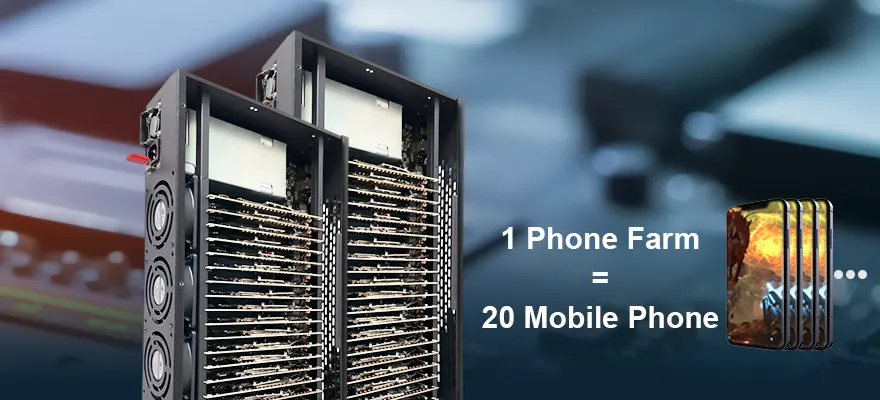
A cell phone farm is a collection of smartphones earning through apps and tasks. I’ve started with 3-5 devices as a hobby and scaled to racks of 50+, making it a viable income. Physical farms require hands-on work, but I’ve shifted to virtual for ease—check PF’s Duoplus review for more.
Essentials to Start Your PF-Branded Cell Phone Farm
From my setups:
- Smartphones: Begin with 3-5 refurbished Androids.
- Charging Setup: Reliable hubs for 24/7 operation.
- Internet: Stable Wi-Fi with proxies.
- Accounts: Multiple per app, tracked carefully.
- System: Label and organize for efficiency.
- Tools: PF-recommended remote software for control.
Recommended Products


Overcoming Common Challenges in Phone Farming
I’ve faced these head-on:
Device Overload: Cloud dashboards simplified management.
Bans: PF’s anti-detect and proxies reduced risks.
Overheating: Switched to cloud to avoid hardware failures.
Maintenance: Automation cut down daily work.
Crashes: Real-time monitoring fixed issues fast.
FAQ: Answers Based on My PF Experience
How to Manage a Phone Farm Online?
Use PF-integrated cloud phones like GeeLark for remote installs, automation, and monitoring.
How to Scale Your Phone Farming Setup?
Start small, add PF tools for physical or cloud growth—I’ve gone from handfuls to hundreds seamlessly.
Is Online Phone Farming Still Worth It in 2025?
Absolutely, with PF’s efficient strategies—focus on automation to offset costs and boost profits.
What Is Phone Farm Software?
Tools like PF’s recommendations for automation, anti-detect, and scaling—essential for turning farms into businesses.